JabRef
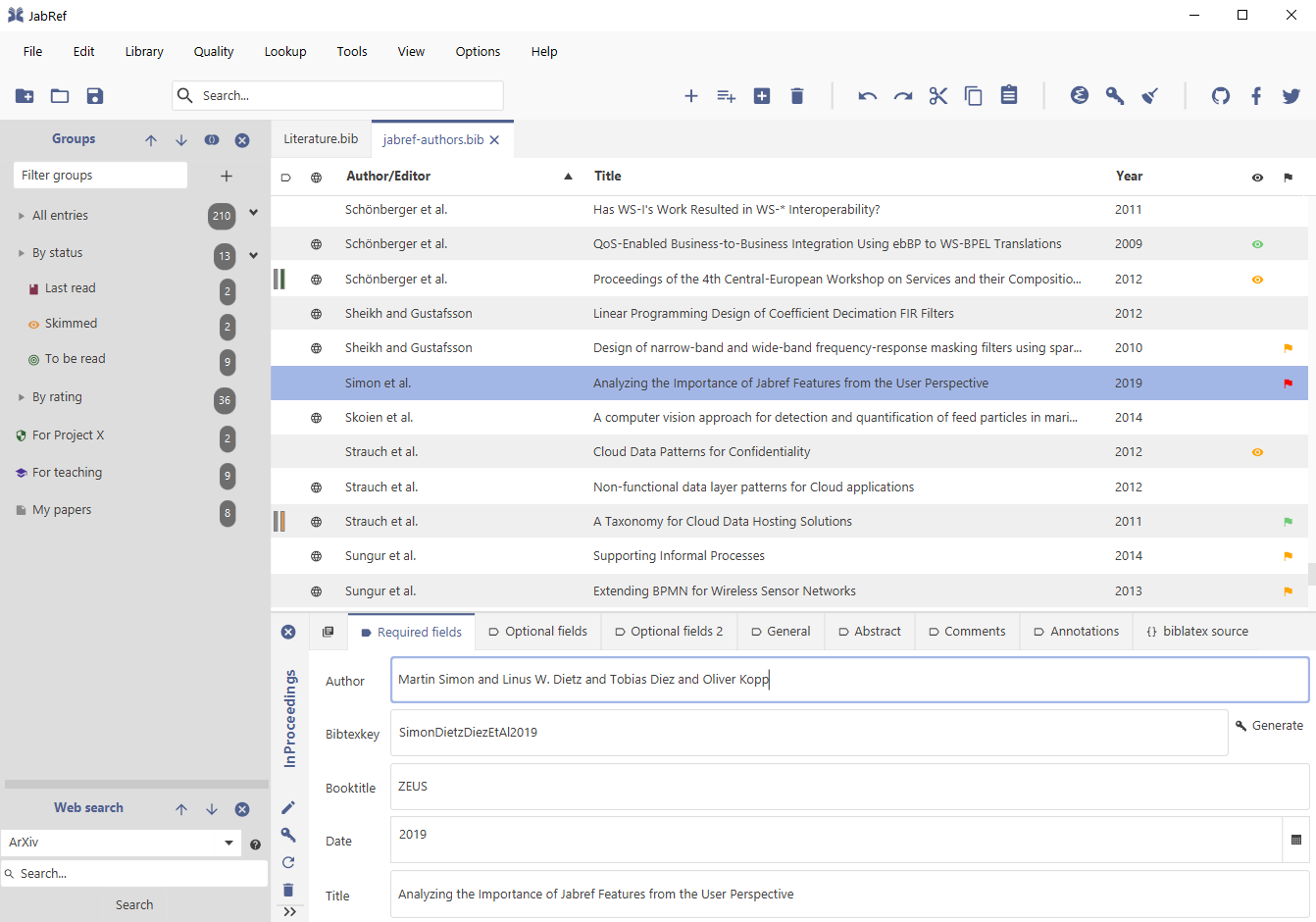
JabRef is an open source bibliography reference manager. The native file format used by JabRef is BibTeX, the standard LaTeX bibliography format. JabRef runs on the Java VM (version 1.8 or newer), and works equally well on Windows, Linux, and Mac OS X.
BibTeX is an application and a bibliography file format written by Oren Patashnik and Leslie Lamport for the LaTeX document preparation system. General information can be found on the CTAN BibTeX package information page. JabRef also supports BibLaTeX.
Bibliographies generated by LaTeX and BibTeX from a BibTeX file can be formatted to suit any reference list specifications through the use of different BibTeX and BibLaTeX style files.
Features
Search the Web
Entries can be searched in external databases and BibTeX entries can be fetched from there. Example sources: arXiv, CiteseerX, Google Scholar, Medline, GVK, IEEEXplore, and Springer.
Import of various formats
RIS, Medline/Pubmed (xml), Refer/Endnote, INSPEC, BibTeXML, CSA, ISI Web of Science, SilverPlatter, Scifinder, OVID, Biblioscape, Sixpack, JStor, and RIS.
Moreover, the FireFox add-on JabFox makes importing new bibliographic information directly from the browser very easy.
Automatic download of full texts
JabRef can be instructed to search for the full text of a reference, download it, and directly link it to the BibTeX entry.
Search the bibliography
Search a pattern in the whole bibliography.
Classification of entries
You can group entries explicitly, by keywords or any other fields.
Integrates to your environment
Launch external applications: PDF viewers, web browser
Insert citations into TeXstudio, LyX, Kile, LatexEditor, Emacs, Vim, and WinEdt
Automatic Key generation
BibTeX keys can be automatically generated in a customizable way from document data, e.g. using author names, title and year.
Support for XMP Metadata in PDFs
Improve the workflow of sharing PDFs and bibliography information
Built-in and custom export formats
HTML, Docbook, BibTeXML, MODS, RTF, Refer/Endnote, and OpenOffice.org as well as LibreOffice
Customization of the JabRef interface
Fonts, displayed fields, etc.
Customization of BibTeX fields
You can add your own fields to any BibTeX entry type.
Translations
JabRef menus and dialog boxes are translated into Brazilian Portuguese, Chinese (simplified), Danish, Dutch, English, French, German, Indonesian, Italian, Japanese, Norwegian, Persian, Russian, Spanish, Swedish, Turkish, Vietnamese.
See our translation page on github for more information and the status of each translation.
Downloads
We use install4j, the multi-platform installer builder.
Help
Documentation
Documentation is available at http://help.jabref.org.
FAQ
Frequently asked questions are available at http://help.jabref.org/.
General Support
Use our discourse forum at http://discourse.jabref.org to get help or to provide feedback.
You can also propose new features there.
Bug and error reports are managed at GitHub.
Development Information
The development of JabRef is managed at GitHub.
You can find the source code and a contribution guide at our github project page at https://github.com/JabRef/jabref.
Changelog
See https://github.com/JabRef/jabref/blob/master/CHANGELOG.md
Donations
Please visit our wiki for more information such as donating via bank transfer.
JabRef development is powered by Baola and Neuronade.
If you need books, please order them at your local bookstore.
In case you stick with Amazon, please use this link.
You can use Amazing Affiliate Link to ensure that the affiliate link always works.
Enter jabref-21 as code.
This seems to work in Germany only.
Resources
JabRef-compatible text editors
JabRef can push entries, i.e. insert \cite{key} commands, to the following text editors:
Additionally, JabRef can natively insert citations and format a bibliography in:
See OpenOffice/LibreOffice integration for details.
External tools
JabFox
by Tobias Diez
JabFox is a Firefox add-on for users of the bibliographic reference manager JabRef. It automatically identifies and extracts bibliographic information on websites and sends them to JabRef in one click. A wide range of publisher sites, library catalogs and databases are supported.
WinEdt’s JabRef launcher
by Karl Koeller
This WinEdt’s package allows to launch the JabRef program from within WinEdt.
Download the WinEdt’s JabRef launcher
Export-Filter Editor
by Felix Wilke
Using this tool you can easily create a custom export filter for JabRef to build you own bibliography style. It supports:
- HTML Export Filter
- RTF Export Filter
- OpenOffice/ LibreOffice Style File
- Saving the filter for later refinements
Download the Export-Filter Editor
PocketBib
by Graham Dennis
PocketBib is a BibTeX library reader for academics on the go. With PocketBib you can search, browse and read the papers in your BibTeX library, and sync them with BibDesk or JabRef on your computer.
Available for iPad, iPhone and iPod Touch.
Eratosthenes Reference Manager
by Matthew Matlock
Eratosthenes Reference Manager is a BibTeX-based bibliography manager for Android. It integrates with JabRef, supporting top-level groups and attached files/external links.
Available for Android 4.0 and up.
Download Eratosthenes Reference Manager
Bibtex4word
by Mike Brookes
Bibtex4Word is an add-in for Microsoft Word that allows the citation of references and the insertion of a bibliography into your document using your choice of formatting style. It is lightweight, transparent and does not mess up your documents.
BibSync
by Daniel Mendler
BibSync is a tool to synchronize your paper database with a BibTeX file which might be most useful for Physicists and Mathematicians since it supports synchronization with DOI and arXiv.
Export filters
JabRef allows you to create custom export filters. This functionality and the installation procedure are described in the help file on Custom export filters. Some users have created export filters that can be useful to many others. This page we provide links or direct downloads for some of these export filters.
If you have created an export filter that you want to share with other users, please notify us. We can provide a download from this page, or a link to your own page.
Mark Schenk’s HTML export filters
Mark Schenk’s HTML export filters provide HTML listings of your reference list. The exported HTML comes complete with scripts for quick filtering of the list.
Note: some of Mark Schenk’s filters are distributed with JabRef as standard export filters.
Download Mark Schenk’s HTML export filters
Daniel Haertle’s HTML export filter
Daniel Haertle’s HTML export filter provides an HTML listing of your reference list. The output looks like this.
Download Daniel Haertle’s HTML export filter
Truong X. Nghiem’s HTML export filter
Truong X. Nghiem’s HTML export filter provides an HTML listing of your reference list that does not contain a header nor a body. Its purpose is to be included in other HTML files or in text-to-html source files (e.g. Jemdoc). The output looks like this.
Download Truong X. Nghiem’s HTML export filter
Marten Kooiker’s RTF export filters
Marten Kooiker has put together a number of export filters outputting RTF references formatted for specific journals.
Download Marten Kooiker’s RTF export filters (v1.0a)
Edward Elgar export filters
Christian Bartolomaeus has made an export filter matching the author guidelines of Edward Elgar. The export filter requires definition of two name formatters - please read the included README file.
Download Edward Elgar export filters
International Journal of Greenhouse Gas (IJoGGC) export filter
This filter is a modified version of Edwared Elgar’s export filters. It formats the exported .rtf file into the format required by lots of Elsevier Journals. You just have to follow the next few steps:
Download the International Journal of Greenhouse Gas (IJoGGC) export filter
APA export filter
Russell Almond’s APA export filter provides an export filter that is close to the American Pychological Association (APA) guidelines. It exports the references in Rich Text Format (rtf).
Download Russell Almond’s APA export filter
CSV export filter with Mendeley tags
Cynthia D’Angelo’s CSV export filter with Mendeley tags provides an export filter that allows for exporting Mendely tags. It exports the refencence in csv format (i.e. spreadsheet- compatible).
Dowload Cynthia D’Angelo’s CSV export filter with Mendeley tags
JabRef journal abbreviation lists
JabRef can help you refactor your reference list by automatically abbreviating or unabbreviating journal names, as explained in the dedicated help file.
While JabRef comes with a build-in list of journals, additional lists are available:
- General
- American Mathematical Society by Tzu-Hao Wei.
- Astronomy by Tim Staley. Note: Please contribute using github.
- Economics by Jeff Arnold (as as posted on the AEA website).
- Entrez by Emmanuel Charpentier. Note: provides Medline (dotless) abbr. only.
- Geology and Physics by an anonymous user.
- IEEE by Thomas Arildsen and “eyliu”.
- Index Medicus by Guy Tsafnat. Note: provides Medline (dotless) abbr. only.
- ISI Web of Science by Alistair Auffret.
- Life Science by Zé Roberto Ribeiro.
- Mechanical and biomechanical by an anonymous user.
- Meteorology by Thijs Heus.
- Sociology by Ronggui Huang.
Plugins
Until version 2.11 JabRef offered a plugin framework. Support for that has been removed. See issue #152 for the current status of integration of the plugins into JabRef.
Entry fetchers
Until version 2.11 JabRef offered a plugin framework. Support for that has been removed. See issue #152 for the current status of integration of the plugins into JabRef.
Contribute
You can foster JabRef’s development with:
Feature requests
Some missing features? Come discuss about it!
Code
Check the issues intended for external contributions and see our CONTRIBUTING.md for detailed information and further links.
Documentation
JabRef’s help can sometimes be outdated or unsatisfactory. Please follow our guidelines to improve it.
Translation
Although JabRef is currently available in 17 languages, some languages lack contributors. Hence, you may help in translating JabRef interface.
Money
If you have no time or skills to contribute to any of the above, please consider making a donation.